Why Does My Amazon Storefront Look Like a Catalog Instead of a Brand?
Amazon brand store design breaks when the Store copies your catalog. Fix the route, the imagery and the refresh cycle, then watch where buyers linger.
- Written by
- WORKINX Studio
- Published
- 23 October 2026
- Read time
- 7 min
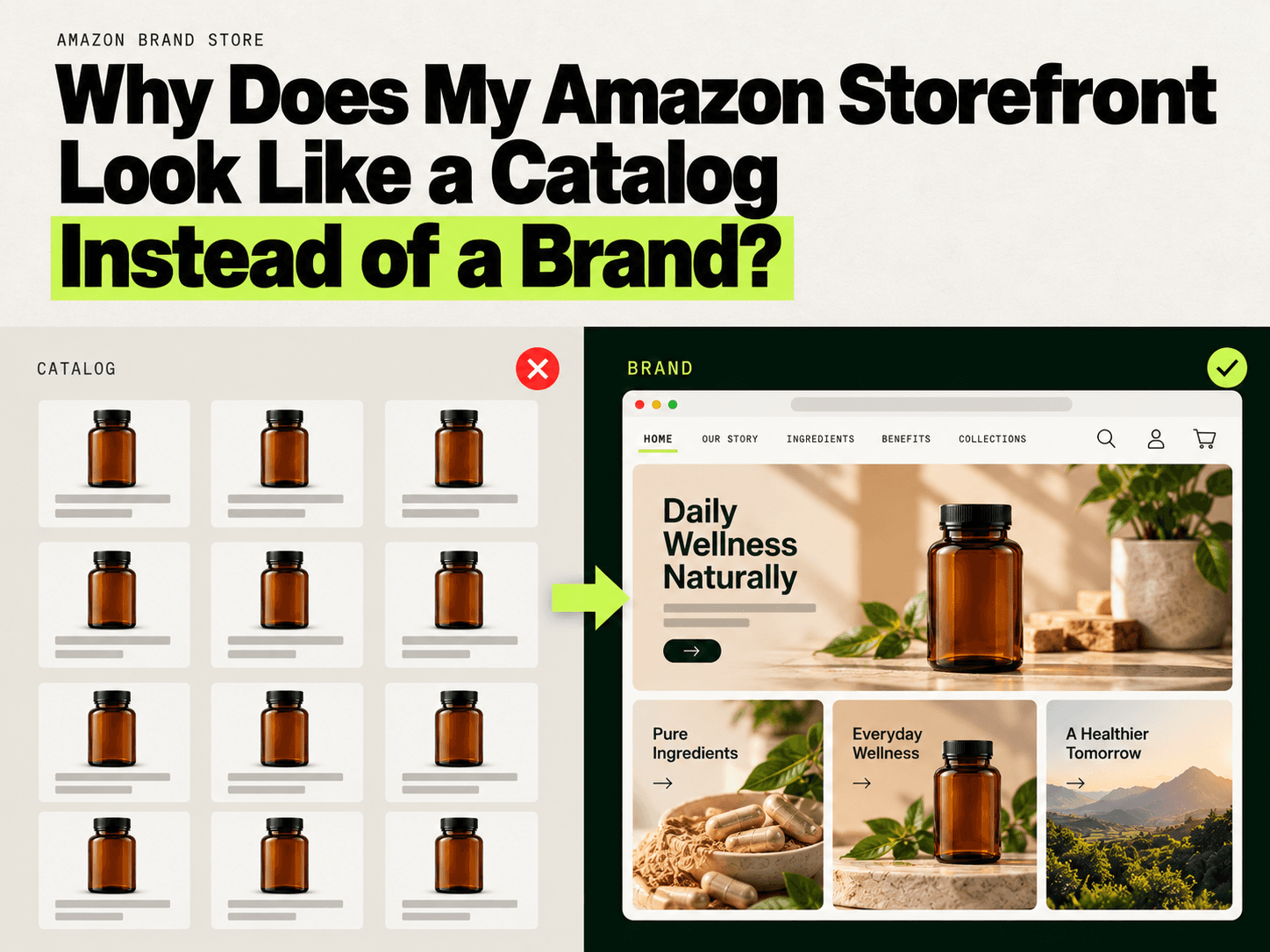
Twenty tiles, four pages, and a menu that mirrors your warehouse spreadsheet. Nothing on it is broken, and nothing on it sounds like you.
Quick take: Store visitors purchase 53.9% more frequently than non-visitors, and amazon brand store design is what separates the ones that do from the ones that do not. Most brands restyle the tiles first and leave the navigation untouched. Fix the route, then the imagery, then refresh every quarter.
Six reasons your Store reads like a catalog
Amazon hands you a builder, a blank grid and a traffic source. The path of least resistance is to pour the catalog in and send your ad traffic at it. That is how a shop becomes a shelf.
The homepage is one big auto-populated product grid
Amazon recommends eight products for the home page product grid, and product tiles rather than a grid when a brand carries fewer than five products. Most brands accept the default and let twenty tiles run the full height of the page. A first-time visitor scrolls, recognizes nothing, and leaves.
Every image is the white-background main image
Reusing main images is the quickest way to make a Store feel like search results. Amazon asks for unique header images on each category page and lifestyle imagery that shows how products are used. Its design guidance also says Store images should not copy Amazon elements such as price references or pack size. A shopper who just left your detail page does not need the same photo again.
Navigation mirrors your SKU hierarchy
When the menu reads 6 oz, 12 oz and Variety 3-Pack, you built it for your spreadsheet. Amazon suggests organizing products by category, product type, use, need or theme. Shoppers arrive with a mission, not a part number.
There is no page that says who you are
Amazon suggests brand identity pages such as About us, How to or Learn more. Few Stores have one. The story ends up buried in an A+ block that describes features instead of answering doubts, where most shoppers never scroll.
No video, no text tiles, no voice
A text tile costs almost nothing and does work photography cannot. Amazon recommends text tiles for brand history and mission. Video carries the same weight. Without either, every page shows an object and says nothing about the people who made it.
It has not changed since launch
Stores updated within the past 90 days averaged 9% more repeat visitors and 10% higher attributed sales per visitor. For most brands, launch day is the only edit the Store ever gets.
Three of these usually show up together. If they do, the fix is structural.
- Your homepage grid runs more than two screens deep.
- Your menu uses sizes, counts or model numbers.
- No page mentions why the brand exists.
What amazon brand store design changes, in practice
The gap is not craft. It is routing. A catalog Store sends every visitor down one path; amazon brand store design asks which one a buyer should take.
| Element | Catalog version | Brand version |
|---|---|---|
| Homepage job | Browse everything | Orient a stranger in five seconds |
| Images | The same main image, repeated | Product in life, new header per page |
| Navigation | Sizes and pack counts | Missions: problem, routine, room |
| Voice | None | Text tiles and short video |
The payoff is not cosmetic. New-to-brand shoppers who visited a Brand Store were 62.7% more likely to purchase and spent 72.3% more per order, according to Amazon's own data.
A catalog Store is a search results page you happen to own. A brand Store is the one surface on Amazon where you decide what a shopper sees first.
What we would check first
Before any amazon brand store design project, open the Store on a phone, not a desktop. Screenshot the homepage and count identical tiles; if six are the same product on white, the grid is doing the talking. Read the menu out loud. When it sounds like a warehouse list, shoppers with a problem to solve have nowhere to land. Then check the last update date in Store Insights.
How to turn a catalog into a brand, step by step
At WorkinX Digital, we have worked on 3,000+ Amazon listings, and the same pattern shows up in Store work: brands rewrite the graphics before they rewrite the route. Run these in order, and treat each step as a hypothesis you can check.
- Rewrite the homepage as a landing page. One line about what you make and who it is for, then a curated grid of eight products or fewer. Hypothesis: a visitor arriving from an ad understands the brand within five seconds. Watch scroll depth.
- Rebuild the menu around missions. Problem, routine, room, occasion. Hypothesis: shoppers reach the right product without opening a size dropdown. Watch pages per visit.
- Add brand identity pages. About us, How to, Learn more. Hypothesis: a skeptic finds one page that answers who they are buying from. Watch exit rate on those pages.
- Give every page its own header and lifestyle shot. A repeated header flattens a Store into one long image. Hypothesis: visitors move between pages instead of bouncing back to search.
- Use shoppable images and curated grids. A shoppable image in a Store can support up to 6 ASINs. Hypothesis: cross-sell rises without a recommendation carousel. Watch units per order.
- Add video and text tiles. Mission on a text tile, demonstration on video. Hypothesis: undecided shoppers stay longer. Watch time on page.
- Design mobile first. In Q1 2024, 78% of Brand Store visits came from mobile. If a headline cannot be read on a phone at a glance, cut it.
The minimum brand asset kit for a small team
Amazon brand store design does not need a studio. It needs four assets, applied the same way on every page.
| Asset | What it has to do | Where it goes | Effort |
|---|---|---|---|
| Hero banner per page | Show the product in use, no price or pack size | Top of each page | Low |
| Mission text tile | Say who you are in two sentences | Homepage and About us | Low |
| One short video | Demonstrate the product doing its job | Homepage or top product page | Medium |
| Shoppable lifestyle image | Place products in real context | Mission pages | Medium |
A phone, a window and two honest sentences cover most of it.
Connect the Store to ads and keep it fresh
Where an ad lands matters as much as what it shows. Advertisers who linked Sponsored Brands to a Store saw shoppers spend twice as long on the Store, with detail page views up 55% and sales up 15%, from Amazon data covering 25,000 US advertisers.
Three habits keep it working.
- Point every Sponsored Brands campaign at the page that matches the ad, never the homepage.
- Amazon recommends updating a Brand Store at least once per quarter, which lines up with Prime Day, Q4 and each launch.
- Read Store Insights monthly and track pages per visitor, not just sessions.
Summary: amazon brand store design at a glance
| Symptom | Likely cause | Fix | Effort |
|---|---|---|---|
| Homepage is one long grid | Default template, no curation | Cap the grid at eight products, add a mission tile | Low |
| Every tile is a white-background image | Main images reused | One lifestyle header per page | Medium |
| Menu reads like a SKU list | Navigation copied from the catalog | Rebuild around missions | Low |
| Visitors cannot tell what makes you different | No identity page | Add About us and How to | Low |
| Pages look identical | One header reused everywhere | Unique header per page | Medium |
| Store feels stale | Untouched since launch | Quarterly refresh calendar | Ongoing |
| Ad traffic bounces | Ads point at the homepage | Match the landing page to the ad | Low |
Frequently Asked Questions
How do I make my Amazon Storefront look more like a brand website?
Lead with a sentence about who you are, not a wall of products. Give the homepage a mission text tile and a curated grid, then route visitors into mission pages instead of size categories. Most amazon brand store design problems are routing problems.
How many pages should an Amazon Brand Store have?
Three to six covers most brands: a home page, one page per mission or category, and an About us page. Fewer strong pages beat fifteen thin ones. Every page you add needs its own header.
Can I use lifestyle images and video in an Amazon Store?
Yes, and Amazon's guidance asks for both. Use lifestyle imagery that shows the product in use, keep prices and pack sizes out of the artwork, and put video where a demonstration answers a real question.
Should I organize my Amazon Store by category or by customer need?
By customer need, in most categories. Amazon suggests organizing by category, product type, use, need or theme, so either is allowed. If shoppers buy by problem, a mission menu gets them there faster.
How often should I update my Amazon Storefront?
Amazon recommends at least once per quarter, and Stores updated in the last 90 days averaged more repeat visitors. Line the refresh up with Prime Day, Q4 and any launch.
Try this today
- Open your Store on your phone and screenshot the homepage. Count how many tiles show the same product on a white background. That number is your problem statement.
- For the traffic side, read where creative leaks attention and check whether each Sponsored Brands campaign lands on a page that matches its promise.
- Book a creative diagnostic with WorkinX Digital. Our Amazon Storefront and listing work starts with review mining and a buyer map, not a moodboard. Send one ASIN and we will show you where buyers stall between the ad and the cart.
Sources
- Amazon Ads, Getting started with Stores, 2025.
- Amazon Ads, Stores, 2024.
- Amazon Ads, Stores best practices, 2025.
- Amazon Ads, Reduce friction to purchase on your Store, 2024.